AWS liveAzure, Google Cloud, Claude next

Your cloud bill, on the desk.

Costaraq is a small display that shows month-to-date cloud and AI spend, from your provider's own billing data, in the room where budget calls happen.

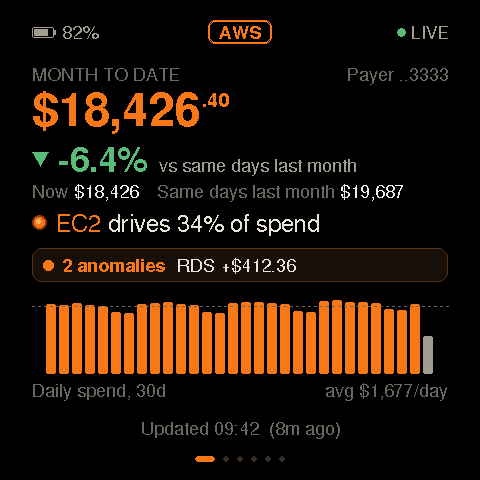
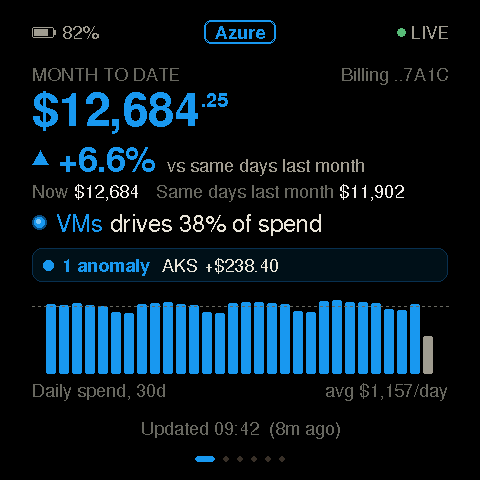
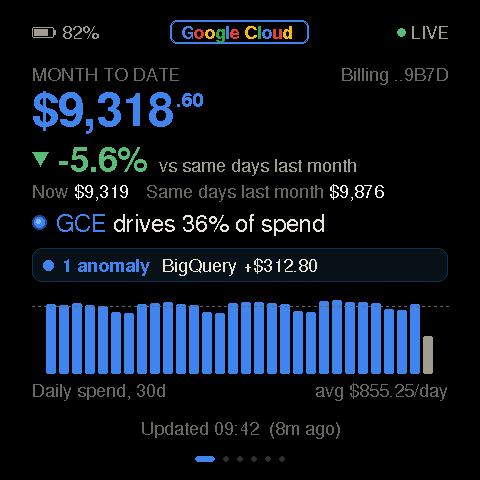
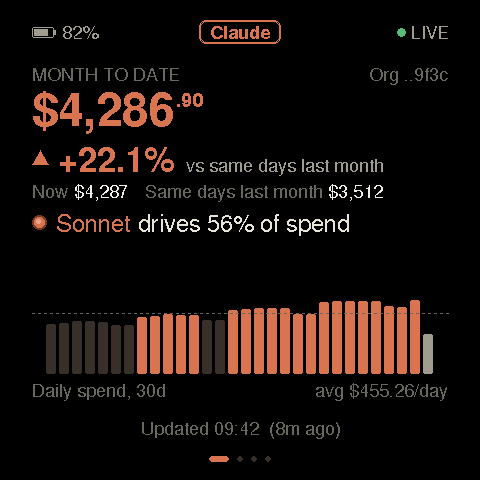
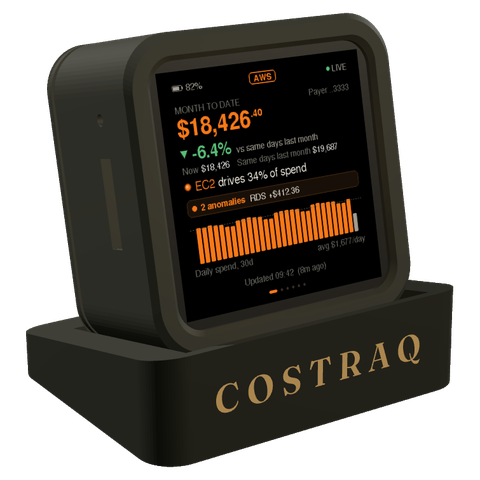
Costaraq desk home screen: AWS month-to-date spend of $18,426, down 6.4% on the same days last month, EC2 driving 34% of spend, with 30 days of daily spend Preview with demo numbers: the same desk in Azure blue, showing $12,684 month to date, up 6.6%, virtual machines driving 38% of spend Preview with demo numbers: the same desk in Google colours, showing $9,318 month to date, down 5.6%, Compute Engine driving 36% of spend Preview with demo numbers: the same desk in Claude terracotta, showing $4,286 of Claude API spend this month, up 22.1%, Sonnet driving 56% of spend
AWS · live Actual desk screens with demo numbers

Why a desk

The bill already exists. It lives in a tab nobody opens.

Cost Explorer and the billing console are excellent, and free. They show the number to whoever goes looking, usually after the month is spent. Costaraq shows the same official number to everyone who walks past, while there is still time to act on it.

In a console

  • Best for digging in: allocation, reports, tags
  • Needs a login and a reason to open it
  • Seen by the one person who looked

On the desk

  • Month-to-date spend and its trend, always on
  • Seen by finance, leadership and the team, without a login
  • Holds no cloud credentials of any kind

On the desk

Built to be read from across the room.

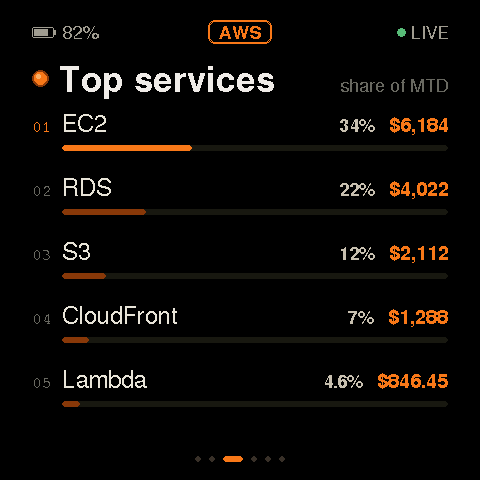
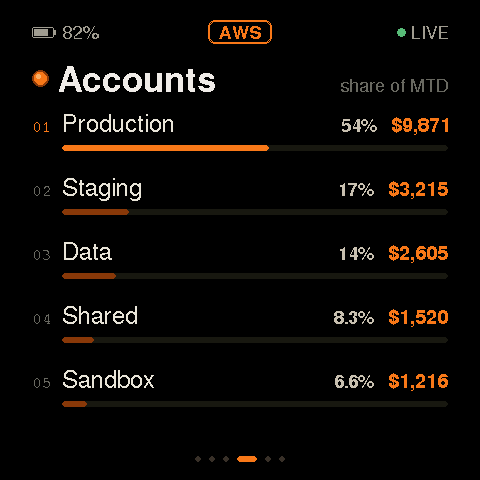
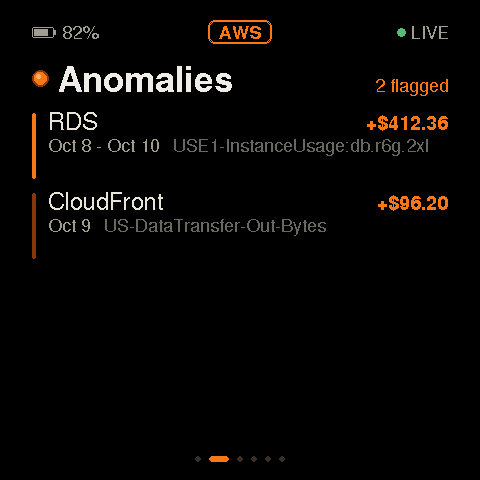
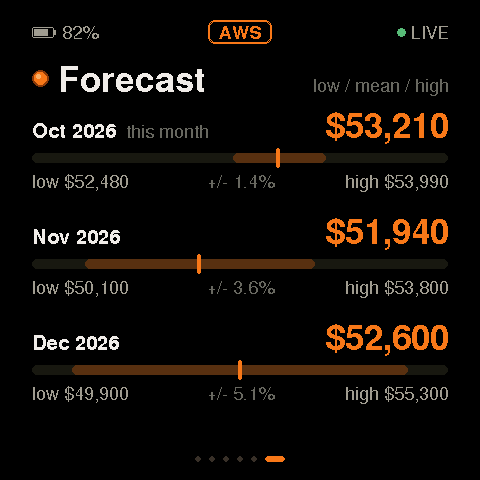
Home screen: AWS month-to-date spend, trend against the same days last month, the service driving it and 30 days of daily spend Top services screen: EC2 34%, RDS 22%, S3 12%, CloudFront 7% and Lambda 4.6% of month-to-date spend Accounts screen: spend by linked account, Production 54% first, then Staging, Data, Shared and Sandbox Anomalies screen: two flagged, RDS up $412.36 and CloudFront up $96.20, each with dates and the usage type behind it Forecast screen: three months ahead, each with its expected total and a low to high range
  1. Home screen: AWS month-to-date spend with trend and 30 days of daily spend 01 · Home

    The month so far.

    Month-to-date spend, set against the same days last month, with the service driving it and thirty days of daily spend underneath.

  2. Top services screen: the five services with the largest share of spend 02 · Top services

    What drives it.

    The five services with the largest share, so the conversation starts at the right line of the bill.

  3. Accounts screen: spend by linked account, largest first 03 · Accounts

    Who is spending.

    Spend by linked account, largest first. Production, staging and the sandbox someone forgot about.

  4. Anomalies screen: flagged cost anomalies with their impact 04 · Anomalies

    What changed.

    Cost anomalies flagged by AWS, with their impact in money and the usage behind them.

  5. Forecast screen: the next three months with a low to high range 05 · Forecast

    Where it lands.

    A three-month forecast with its low and high range. Regions and remaining credits get their own screens when you have them.

The desk moves through its screens on its own. Every screen above is the real desk software, shown with demo numbers.

Costraq desk in the Graphite finish: a matte graphite housing tilted back on a black stand with COSTRAQ lettered in champagne across the front

The desk · Graphite

A small, quiet object.

A 2.16-inch AMOLED screen in a housing tilted back 12° on its stand. Drag it round. Pick the finish for your desk.

Size
61 × 50 × 63 mm (W × D × H)
Screen
2.16″ AMOLED, 480 × 480, touch
Tilt
12° back
Power
One USB-C cable, out of the back

Platforms

AWS today. Azure, Google Cloud and Claude next.

Every provider gets the same desk in its own colours. The AWS connector is live; the others are shown with demo numbers ahead of their connectors.

  • AWS on the desk: month to date, trend and daily spend
    Amazon Web Services Live
  • Azure on the desk: billing account month to date, trend and daily spend (preview, demo numbers)
    Microsoft Azure Next
  • Google Cloud on the desk: billing account month to date, trend and daily spend (preview, demo numbers)
    Google Cloud Next
  • Claude API on the desk: organisation month to date and the model driving it (preview, demo numbers)
    Claude (Anthropic API) Next

Later: Cursor and OpenAI. And any HTTPS JSON API you own.

How it works

Set up once. Then it just shows the number.

  1. Connect your AWS account

    Run one install command in your AWS payer account. It creates a small connector there with read-only access to billing, and nothing else.

  2. It keeps itself current

    The month-to-date total refreshes every 30 minutes; services, accounts, anomalies and the forecast once a day. The desk picks up a change within minutes.

  3. Claim the desk

    Type the desk's serial number in the console. The desk receives its own read-only access over an encrypted channel; nobody copies a key by hand.

Security

Built so a desk in the room is never a key to your cloud.

The desk shows a number. Everything that could spend money, read your data or change your accounts stays somewhere else, behind controls we test on every change.

Read-only billing access

On AWS the connector runs in your own payer account with a billing-read role, and we never hold your keys. Azure and Google Cloud are read from Costaraq's account with a billing-read role, keyless (federation) wherever the provider allows it. Claude's cost API needs an Admin key and Anthropic has no read-only one, so we ask for a dedicated key you can revoke in the Anthropic Console at any time: we store it encrypted, only the Claude reader can open it, and our code calls only the cost and usage reports. Offboarding removes everything we created.

No secrets on the desk

The desk holds one narrow desk token that can only read its own status. It arrives over an encrypted device channel after you claim the desk, and rotating it revokes the old one at once.

An identity per desk

Each desk makes its own private key on the chip and gets its own certificate. Every connection to the cloud is mutually authenticated TLS. One stolen desk cannot speak for another.

Signed updates only

Firmware is signed with a key held in a hardware security module that only our release pipeline can use. The desk checks the signature, refuses older images and rolls back a bad update by itself.

A console that keeps tenants apart

Sessions last 60 minutes and signing out revokes them. Every request is checked against the account that owns the desk, with per-user rate limits. You can export or delete your data from the console.

Checked on every change

Each release passes static analysis, dependency vulnerability scans, infrastructure policy checks and sanitizer-run firmware tests before it can ship. No third-party scripts or trackers run on this site.

Next, before general availability: secure boot and flash encryption on every desk, so the firmware and the keys cannot be read or replaced over USB.

Pricing

One desk, one subscription, one setup.

Business pricing for the display, the service that keeps it current, and getting your first connector live.

INR list prices · USD on request · GST extra where applicable

Hardware

Display

₹24,900

One-time · yours to keep

The desk itself, with a 480 × 480 AMOLED screen. It holds no cloud credentials. Your brand on it comes with Implementation.

Onboarding

Implementation

₹49,900

One-time · first connector

Your first platform connector, your brand on the desk, and go-live with us. Each further platform is its own Implementation.

Design partners can ask for a time-boxed setup credit when we onboard the first connector together.

FAQ

Questions, answered plainly.

What is live today?

The AWS connector, claiming a desk from the console, over-the-air updates, and the desk's screens: month-to-date spend, the trend against last month, top services, linked accounts, anomalies and the forecast. Next: Azure, Google Cloud and Claude (Anthropic API). Later: Cursor and OpenAI.

Why not just use Cost Explorer? It's free.

Cost Explorer is the best place to dig in, and the desk shows numbers from the same AWS billing data. Costaraq is for the room: everyone sees month-to-date spend without opening a tab.

How fresh is the number?

The month-to-date total refreshes every 30 minutes in your own AWS account, and the desk picks up a change within minutes. Services, accounts, anomalies and the forecast refresh once a day. AWS itself updates billing data a few times a day, so the desk is as current as AWS is: glanceable, not a trading screen.

Where do the keys live?

Your cloud credentials never leave your account; the connector there uses a read-only billing role. The desk holds one token that can only read its own status, delivered over an encrypted device channel when you claim it. This website never shows that token.

How do I start?

Create an account, open Connectors and choose Set up AWS. Run the install command it gives you in your AWS payer account, then type your desk's serial number to claim it. Updates reach the desk over the air; no cables or USB.

Put the number in the room.

Connect AWS with one command. Claim the desk. Everyone sees the same number.